


Historical Post: This article was originally written in 2016. The technology discussed may be outdated or deprecated. Keeping it here for historical reference and to show I’ve been blogging since 2015!
Overview
This tutorial demonstrates building a World of Warcraft realm status application using AngularJS. The guide covers making HTTP requests to Blizzard’s API, populating HTML tables with dynamic data, and implementing sorting and filtering functionality.
Prerequisites
The setup requires organizing files into css, js, and fonts directories, with the js folder subdivided into home and libs subdirectories. Third-party dependencies include Bootstrap 3, Font Awesome 4, and UI Bootstrap directives.
Core Implementation
Factory (app.factory.js)
Manages API communication using JSONP requests to fetch realm data. The service builds endpoint URLs dynamically and handles success/failure responses through promise chains.
Controller (home.controller.js)
Implements user interaction logic, manages sorting parameters (sortType, sortReverse), and handles search filtering. The controller injects the RealmService factory to retrieve data on initialization.
Filters (app.filters.js)
Two custom filters are defined—one capitalizes text strings, another formats realm connection lists by replacing hyphens with spaces.
HTML Markup
Implements ng-repeat directives to render table rows with dynamic sorting via clickable headers, search filtering through ng-model binding, and UI Bootstrap popovers displaying connected realms.
The Result
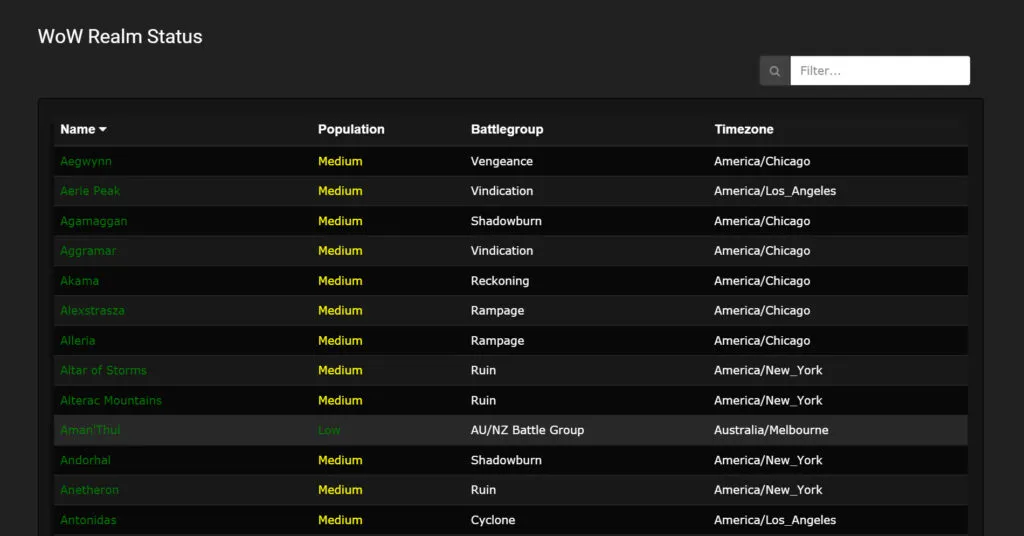
Here’s the finished application showing realm statuses with sorting and filtering:
Resources
- GitHub Repository: Full source code available
- Live Demo: Functional application demonstration hosted on the author’s site
- API Documentation: Blizzard’s Battle.net API requires registration for keys